Drambo
Buy

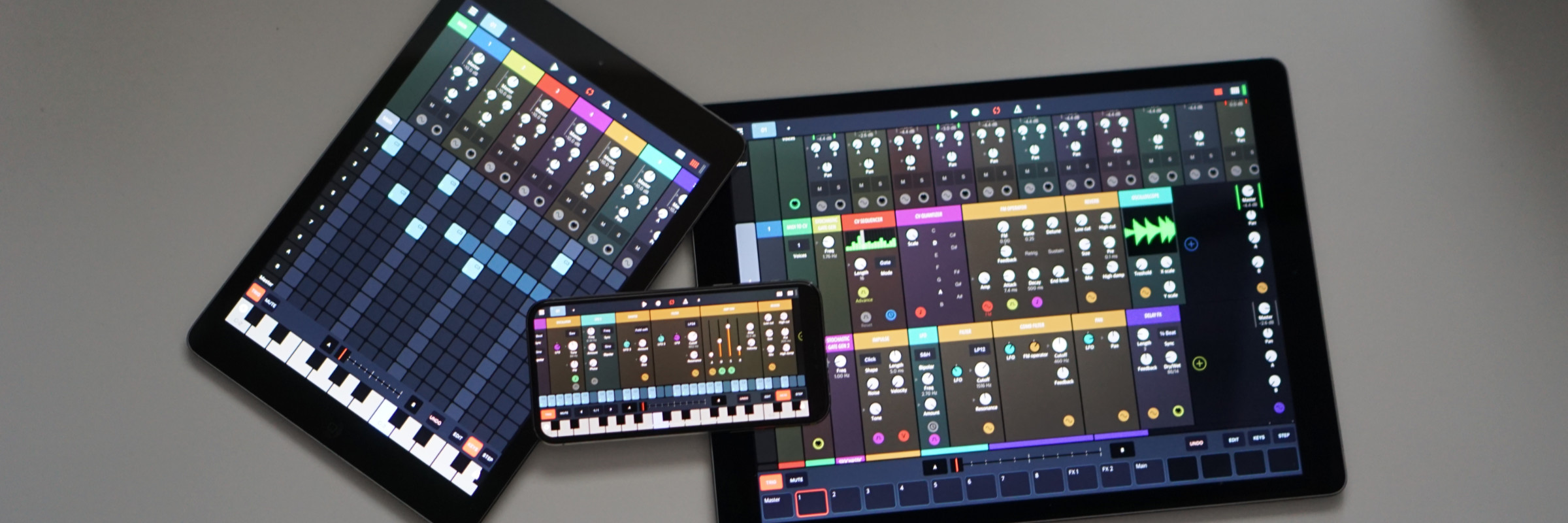
Drambo is an innovative modular groovebox and audio-processing environment. Build synthesizers, sample-based instruments, and audio effects from modular components, with high-quality DSP and audio-rate modulation throughout. Combined with a powerful sequencer, Drambo is a versatile tool for sound design, composition, performance, and experimentation. It’s an all-in-one sound laboratory that adapts to your workflow, whether you want to build beats, perform live, design synths, or transform audio with effects, either standalone or inside your favorite DAW.

"Drambo changes the face of iOS music apps." Cult of Mac


Fluid, Instant Modularity
Modules are connected automatically, with no cables as you add or rearrange them. A dynamic interface creates modulation knobs when you need them. Modules may house other modules, so you can keep your patch well organized. Of course, automatic connections can be overridden.
Use Morph modules and Morph functionality to instantly modulate any number of parameters. Morph can be modulated by other modules.
Over 150 modules available: oscillators, samplers, Audio Units, filters, modulators, distortions, effects, sequencers and more. Tap to insert, drag and drop to rearrange, swipe down to remove. Everything is instant and at your fingertips.
Hold any input to instantly inspect or monitor its signal in real time.

Polyphonic stereo processing with up to 16 voices, each of which can be modulated independently.

All signals are equal. Freely route modulation signals into audio inputs or the other way around.


Groovebox
Choose the sequencer that fits your workflow and build anything from quick patterns to full performances. Explore far beyond traditional looping with parameter locks, conditional step logic, automation, and powerful scene morphing. Work with any meter, polyrhythms, or polymeter.

From step sequencing and piano roll editing to detailed control over gates, velocity, probability, retrigger, and cycle, every sequence can become as simple or complex as you want. Add step components to build complex logic into every sequence.


There’s a lot you can do, but it can stay simple. The step sequencer is visible almost all the time and follows a familiar hardware-style workflow: hold one or more notes and tap a step to add them, or hold a step and toggle piano keys to add or remove notes from it. Each clip can have up to 128 steps, and you can instantly select and edit any part using the multi-gesture sequence navigation bar.
Automate any parameter with ease. For instant control, hold a step and turn any knob to set its value for that step with parameter locks. You can also lock parameter values to a clip in the clip launcher using clip locks.
For deeper control, draw complex Bézier curves to create detailed modulation.
Use the song arranger/clip launcher to build your tracks.
Arrange patterns and clips, then drag and drop to reorganize or copy them.
Use the clip launcher as a performance tool: trigger and combine clips in real time, switch patterns and variations, and reshape your arrangement on the fly while everything stays in sync.
The groovebox and modular engine are tightly integrated as one system. Tracks are modular racks that can be selected and controlled directly from the groovebox, giving you hands-on access without breaking your flow. If you prefer to keep things simple, tracks can also host only Audio Units with no modular patching required.


Perform
Perform with Drambo effortlessly using the Morph slider, expressive UI modules like XY pads, and bidirectional MIDI mapping.

Morph many parameters across multiple tracks using a single slider with Morphs, a performance feature that gives you expressive control. Up to 16 Morphs can be assigned and easily selected via pads.
Drambo supports MIDI controller profiles and bidirectional communication, so your controller does more than send MIDI to Drambo: it also receives feedback that reflects the current state of your project, such as updated LEDs or automatically moving motorized faders. You can map most Drambo elements, including the step sequencer and clip launcher.

There is more
As you explore Drambo, you’ll find yourself drawn into countless creative rabbit holes.

Live DSP coding
Create custom modules with the Code module using a simple expression language built for real-time synthesis and high-performance DSP. Define inputs, parameters, and outputs, and they instantly appear in the surrounding module, ready to connect.
Drambo Visual Expansion
Drambo Visual is an optional in-app purchase for Drambo. It adds a complete modular graphics environment for building real-time visuals, connecting graphics to sound and sequencing, performing through an external display over HDMI, and exporting synchronized audio and video.

Explore Drambo Visual
Drambo Visual modular graphics environment

Supported devices and platforms
  • iPad (requires iPadOS 15.6 or later) - standalone app, AUv3 instrument, AUv3 effect, and AUv3 MIDI effect.
  • Mac with Apple silicon, available from the Mac App Store under the "Made for iPad" tab - standalone app, AUv3 instrument, AUv3 effect, and AUv3 MIDI effect. Works in DAWs with AUv3 support, including Ableton Live and Logic Pro.
  • iPhone (requires iOS 15.6 or later) - standalone app, AUv3 instrument, AUv3 effect, and AUv3 MIDI effect.

Features

Unique modular concept: a cable-free, drag-and-drop workflow with a color-coded dynamic interface, automatic connections, and customizable compact rack views.

Directional flow provides a clearer overview. There is no instantaneous feedback routing in Drambo. Delayed feedback is possible using certain modules.

Simple and clean interface that scales to every size and device orientation.

Custom modular racks, presets on different levels.

Polyphonic, stereo processing. Audio-rate modulation. All signals are equal.

Multiple modulators per parameter without additional mixer modules.

Polyphonic step sequencer with parameter locks and step components. Up to 64 beats and 256 steps per pattern.

Over 150 modules available, such as oscillators, samplers, physical modeling modules, LFOs, envelope generators, filters, audio effects, mixers, MIDI processors, sequencers and math functions.

Morph groups: you can morph many parameters using a single slider.

Audio Unit hosting. Instrument, effect, and MIDI effect AUv3s are visible as Drambo modules.

Available as a standalone app, AUv3 instrument, effect, and MIDI effect.

Support for MIDI controllers.


Support
User guide
User forum
Community patches on Patchstorage

Tutorial videos by Ben Richards
Quickstart
Walkthrough
The full list

Tutorial videos by SoundForMore
51 tutorial videos
Requirements

64-bit iPad, iPhone, or Mac with Apple silicon


You can use Drambo as
  • A complete music production and performance environment.
  • An endless modular playground that allows you to build, modify, and store custom instruments and effects. For instance, build a custom synth, sample and resample, build a Theremin using a gyroscope module, or turn your table into a playable surface by processing microphone input with physical modeling modules. Get weird or make functional instruments and tools.
  • A MIDI sequencer that works with hardware and AUv3 instruments. For example, Drambo can sequence other instruments in an AU host app. It can also generate custom MIDI CC messages or modulation signals to control modular synths via DC-coupled interfaces.
  • An AUv3 synthesizer, effect, or sequencer in other DAWs.

Concept, development, UI design: Jaroslaw Jacek (BeepStreet 2020)

Some great people who spent many hours testing Drambo and inspiring me:
Gravitas, Luke Donovan (Spectral Park / Child Of The Corn Dog), Benjamin Richards, Stef a.k.a. rs2000, Trevor Llewellyn, Matthias Kroh, Fleksi, Samuel 'samu' Lindeman, Warren Lee

And all the passionate people in the Audiobus Drambo thread (can you imagine 170 pages about an unreleased app? :D). Love!